Rome By Limo
Private Transfers, Tours & Shore Excursions
We Make Every Your Minute Count

transfer
 Transfers

TRANSFERS

Transfers to and from airports, Civitavecchia and Rome

Fiumicino Airport (FCO) to Rome (and viceversa)

Ciampino Airport (CIA) to Rome (and viceversa)

Fiumicino to Civitavecchia Port (and viceversa)

Rome to Rome

Read all...

Book now

tours-in-rome
 

TOURS IN ROME

Private tours in the best highlights of Rome

Rome and the Vatican

Driving city tours

Roman hills & Castelgandolfo

Tivoli garden - Hadrian's villa

Rome by nigth

Read all...

Book now

tours-from-rome
 

TOURS FROM ROME

Private tours from Rome to the near tourist highlights

Florence

Assisi

Pisa

Amalfi coast & Pompeii

Wine tour - Chianti area

Read all...

Book now

shore-excursions
 Transfers

SHORE EXCURSIONS

Excursions from the cruise docks of Civitavecchia, Naples and Livorno

Read all...

Book now

other-services
 Transfers

OTHER SERVICES

Ceremonies & Weddings

Corporate Limousine Service

Night Movements for Entertainments

Shopping Tours Service

Town Movements or Long Trips

Read all...

Book now

Icons

YOOtheme is a well-known template and extension provider for Joomla and WordPress who helps you to create professional websites. But to make your website or interface design a real eye-catcher there was one thing missing: Icons! Icons are an essential tool to simplify user interfaces and today almost every major website uses icons to highlight important parts in their content.

This is why we created a great resource of beautiful and handcrafted icons for web and print projects. We got commercial icon sets including e-commerce, community, hosting and tool icons and many more as well as many freebies.

As a member of our icon club you will get access to hundreds of handcrafted and detailed icons.

Visit Website

Club Icons

Club Icons

  • Pixel perfect design
  • 8 PNG sizes from 16 to 512 pixels
  • Optimized for each size
  • Scalable vector sources
  • Easy to customize

Layouts

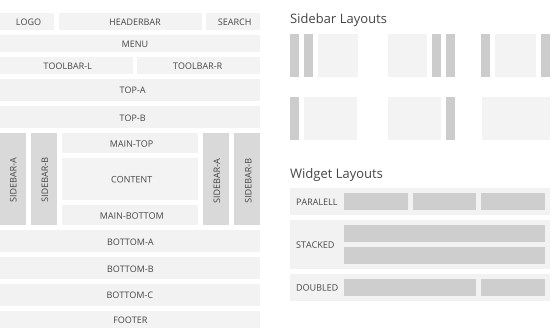
Warp comes with a sophisticated layout system to create any kind of sidebar or widget layout. You can easily manage the sidebar's positions and widths in the theme administration. Widgets can have different styles and be placed in any position offered by this theme. Each position has its own layout. You can align widgets side-by-side, stack them or choose your own grid layout. Show or hide widgets on mobile devices, while the grid adapts perfectly to your layout.

Warp Layout System

Lightbox

The Widgetkit Lightbox allows you to view images, HTML and multi-media content on a dark dimmed overlay without having to leave the current page.

Features

  • Display images, videos, HTML, Iframes, Ajax requests and SWF
  • Supports YouTube, Vimeo, MP4 (h.264), WebM and FLV movies
  • Group lightboxes and mix different content types
  • Responsive design to fit all device resolutions
  • Load other widgets in a lightbox
  • 3 different opening and closing transitions
  • 4 different caption styles
  • Keyboard and mouse scroll wheel navigation
  • Built on the latest jQuery version
  • Works with Joomla and WordPress

Examples

Different animations - fade, elastic and none

Different title positions - float, inside and over

Various examples in one gallery (try also using the keyboard and mouse scroll wheel)

Lorem ipsum dolor sit amet, consectetur adipisicing elit, sed do eiusmod tempor incididunt ut labore et dolore magna aliqua. Ut enim ad minim veniam, quis nostrud exercitation ullamco laboris nisi ut aliquip ex ea commodo consequat. Duis aute irure dolor in reprehenderit in voluptate velit esse cillum dolore eu fugiat nulla pariatur. Excepteur sint occaecat cupidatat non proident, sunt in culpa qui officia deserunt mollit anim id est laborum.

Load Widgets In A Lightbox

Use #wk-ID to load widgets like slideshows or galleries in a lightbox. For example: Widgetkit Slideshow

<a data-lightbox="width:600;height:300;" href="#wk-10">Lightbox</a>

How To Use

Use the HTML5 custom data attribute data-lightbox to activate the lightbox. You can set various lightbox parameters to the data attribute. For example:

<a data-lightbox="width:1000;height:600;" href="http://www.wikipedia.org">Lightbox</a>

Here is a list of the most common parameters:

  • titlePosition - How should the title show up? (float, outside, inside or over)
  • transitionIn - Set a opening transition. (fade, elastic, or none)
  • transitionOut - Set a closing transition (fade, elastic, or none)
  • overlayShow - Set to true or false
  • scrolling - Set to yes or no
  • width - Set a width in pixel
  • height - Set a height in pixel
  • padding - Set a padding in pixel

Map

The Widgetkit Map provides a simple solution for adding a map to your website. Various features let you customize the map, like changing colors and adding markers or directions.

Features

  • Location selection with auto geocoding
  • Supports multiple map markers with text popups
  • Option to get the direction to the active marker
  • Supports custom map styles and colors
  • Uses the latest Google Maps API
  • Built with HTML5, CSS3, PHP 5.3+ and the latest jQuery version
  • Works with Joomla and WordPress

Direction Example

This map features all map controls, multiple markers and you can get the direction.

Color Scheme Example

Set or invert the hue, saturation, lightness and gamma of a map.

Minimal Example

This map has a fixed width, no controls and no markers.

How To Use

With the Widgetkit Map you can quickly create and manage simple maps with features like multiple markers, text popups and custom color schemes. Once you have created a map, you can load it anywhere on your website using shortcodes or the universal Widgetkit Joomla module or WordPress widget.

Media Player

The Widgetkit Media Player is a HTML5 audio and video player completely built with HTML and CSS. You can easily embed video files into your website by using the HTML5 video element. A Flash player fallback is included for all unsupported browsers.

Features

  • Native playback for modern HTML5 browsers
  • Supports MP4 (h.264), WebM, FLV, WMV and MP3 files
  • Completely built with HTML and CSS
  • Responsive design to fit all device resolutions
  • Same UI in all browsers
  • Create your own skins
  • Flash player fallback for unsupported browsers
  • Works with Joomla and WordPress

Examples

This is a MP3 Audio Sample:

How To Use

Use the HTML5 video element to embed video in your website. For example:

<video src="/video.mp4" width="320" height="240"></video>

You can also provide multiple sources, to add support for the different video formats like h.264, WebM or Ogg:

<video width="320" height="240">
  <source type="video/mp4"  src="/video.mp4" />
  <source type="video/webm" src="/video.webm" />
  <source type="video/ogg"  src="/video.ogv" />
</video>

Use the HTML5 audio element to embed MP3 files in your website. For example:

<audio src="/audio.mp3" type="audio/mp3"></audio>

Contact us

For informations
or any issue
contact us

Contact us

Get a quote

If you want a quote
to particular service
click button below

Get a quote

Booking

To book all our services
click button below

Book now

Our Guarantees

  • All vehicles are fully insured
  • Authorized to reach center of Rome
  • Drivers are english speaking
  • No hidden charges
  • 20 years experience

Tripadvisor

tripadvisor